This article may contain affiliate links.
Last updated on November 26, 2026
In GTA 6, how to save your game is simple: from the pause menu, not from your phone like in GTA 5. You get 15 manual save slots, plus a separate slot for the autosave.
It’s worth using them wisely, because GTA 6 doesn’t let you replay story missions. Below you’ll find the steps, the limits and how to organize your saves.
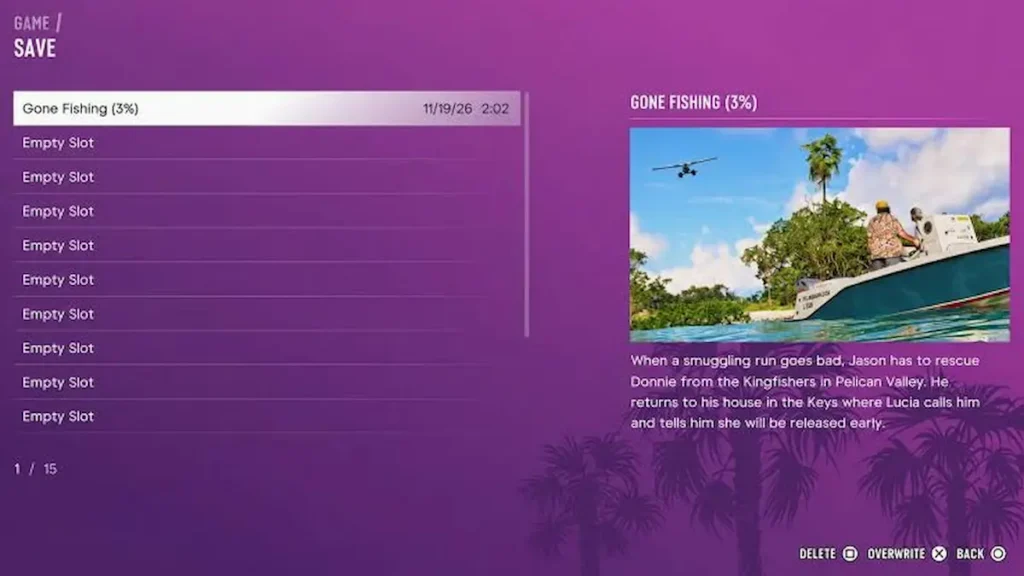
GTA 6: how to save your game manually
- Pause the game: Options on PS5 or Menu on Xbox Series X|S.
- Go to the Game section.
- Choose Save Game.
- Pick an empty slot or an old save you want to overwrite, and confirm.
If you’re coming from GTA 5, don’t bother looking for Quick Save on the phone. In GTA 6, manual saving lives only in the pause menu.
How many save slots does GTA 6 have?
You get 15 slots for manual saves and a single autosave slot, kept separate. The game saves automatically as you progress, but the autosave always writes over the same slot.
15 slots sounds like a lot, but the story has more than 90 main missions, so it pays to use them with a plan.
When you can’t save
- During the prologue. Manual saving only unlocks after you finish the opening sequence.
- During missions. The Save Game option is usually greyed out while you’re on a mission. Save before or after, in the open world.
- When you use cheats. Any cheat code disables saving, trophies and achievements for the rest of the session. You’ll find the details in our article on GTA 6 cheat codes.
How to load a save
Also from the pause menu: Game, then Load Game. Pick the slot you want and the game takes you back to that exact moment.
Can you replay missions in GTA 6?
No. GTA 6 has no mission replay option for the story. Once you finish a mission, you can’t pick it from a menu and play it again, and finishing the story doesn’t unlock anything like that either.
That’s a big change from GTA 5, where you could replay completed missions from the menu.
The likely reason: in GTA 6, many missions have choices that change what happens later, including which characters live or die. Replaying missions on their own would mess with those consequences.
The only way to go back to a mission is to load a save from before it.
How to organize your 15 slots
Since there’s no replay, your saves are the only way back to the big moments. A few tips:
- One slot at the start of each chapter. The story has 5 chapters, so keep one save at the start and one at the end of each. That’s 10 slots.
- Rotate the other 5 slots. Save after every mission, each time in a different one of those 5, so you always have a few recent saves.
- Save before missions with choices. That way you can see the other outcome later without starting the game over.
- Save before you try cheats. Once a code is on, you can’t save for the rest of that session.
If you’re just getting started, check out what to do in your first hours of GTA 6.

I’m passionate about books and video games. These two great passions represent, for me, a boundless universe where I can “escape” from reality whenever I need or want to. There are so many stories, worlds, and landscapes where I can instantly teleport that I don’t think a whole lifetime would be enough to explore them all (though it would be my greatest dream to be able to).