
Last updated on September 15, 2026
Bulkhead took Wardogs servers offline yesterday, September 14, for scheduled maintenance to deploy Patch 0.11, focused on server browser improvements and community server discoverability. Since the servers came back up, a number of players have been unable to log back in, hitting a login/connection error that stops them from launching into a match, or from starting the game at all.
Bulkhead hasn’t put out a specific acknowledgment or fix for this particular login issue yet, so if you’re stuck on it after updating, you’re not alone, and there’s already a workaround being shared by affected players that’s getting people back in.
Beyond the login trouble, Patch 0.11 itself brings a couple of other changes worth knowing about: community servers now keep a persistent ID instead of resetting it on every map change or restart, so you can rejoin a specific server directly, and community matches now hand out a 5% cash bonus at the end of a round. Bulkhead framed the patch as thanks to the community for helping the game cross 400,000 peak concurrent players since launch, and as the first step in a wider push to improve community servers rather than a finished overhaul.
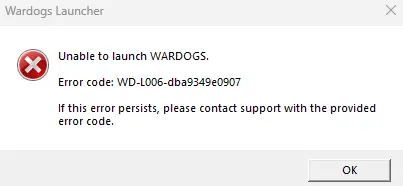
The fix: repair Elytra
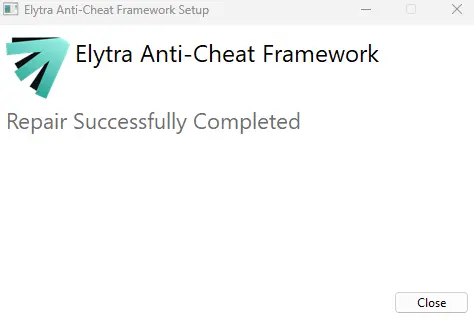
The issue seems tied to Elytra, the anti-cheat/launcher component bundled with Wardogs, likely left out of sync by the client update that shipped with Patch 0.11. Running a repair on it has resolved the login error for several players:
- Go to your Wardogs install folder, then into the Elytra subfolder. By default this looks something like:
D:\Steam\steamapps\common\Wardogs\Elytra(adjust the drive and path if your Steam library is installed elsewhere) - Run Elytra-Setup
- Select Repair
- Launch Wardogs again
No reinstall needed, just a repair of that one component.
Why this matters
This is the third time since the Early Access launch on September 10 that players have had to chase down their own fix for a login problem, after the initial launch queues and the day-one hotfix. Hunting through install folders isn’t something casual players should have to do to get into a game they already paid for, and each time it happens without an official callout, it makes the fix that much harder to find. We’ll update this if Bulkhead confirms the cause or pushes an official patch.
In the meantime, if Patch 0.11 has locked you out with a login issue, connection problem, or the game simply refusing to start, the Elytra repair above is worth trying first.

I’m passionate about books and video games. These two great passions represent, for me, a boundless universe where I can “escape” from reality whenever I need or want to. There are so many stories, worlds, and landscapes where I can instantly teleport that I don’t think a whole lifetime would be enough to explore them all (though it would be my greatest dream to be able to).